Python Challenge - Level 16
- Link: http://www.pythonchallenge.com/pc/return/mozart.html
- Username: huge
- Password: file
Problem
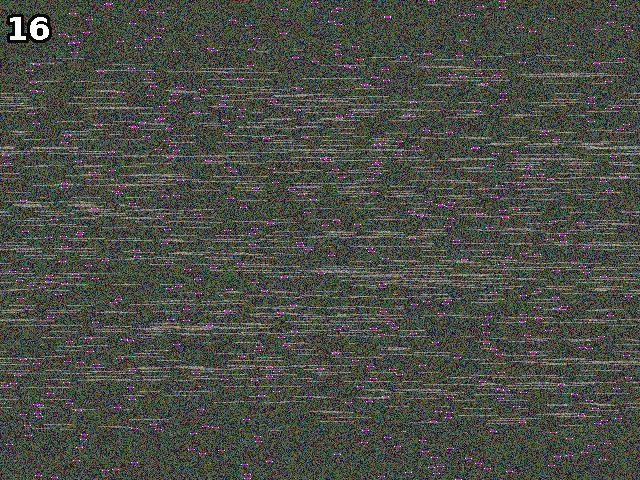
Title: let me get this straight
The image is a noisy 256-color palette image where each horizontal row contains an identical magenta/pink bar. Because each row is horizontally offset, the image looks scrambled. We need to align (straighten) each row so the magenta markers line up at the same x-coordinate.
Analyzing the image palette and histogram reveals that palette index 195 (or RGB (255, 0, 255)) appears exactly once per row as a distinctive bar.
Solution
Python
We can cycle-shift each row using NumPy or list slicing so the marker moves to column 0:
from PIL import Image
import numpy as np

img = Image.open("mozart.gif")
w, h = img.size

# Palette index 195 corresponds to the magenta marker
data = np.array(img)
shifted = np.empty_like(data)

for y in range(h):
    row = data[y]
    # Find the start of the magenta marker
    idx = int(np.where(row == 195)[0][0])
    shifted[y] = np.roll(row, -idx)

result = Image.fromarray(shifted)
result.putpalette(img.getpalette())
result.save("straight.gif")
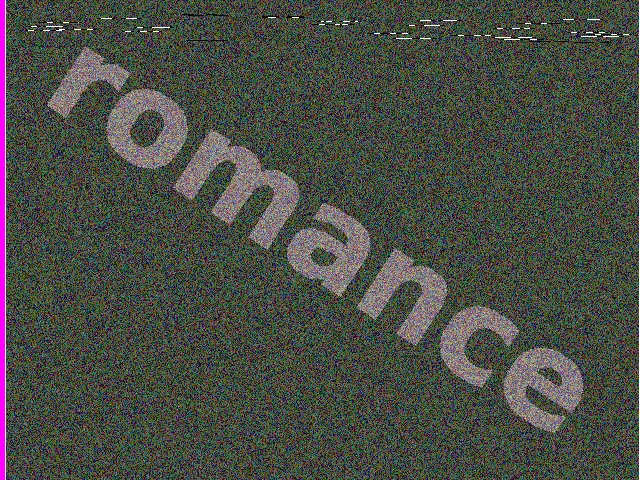
The straightened image displays the word romance:
Go
In Go, we decode the image, find the index of the magenta pixel in each row, and rotate the byte slice:
package main

import (
	"image"
	"image/gif"
	"os"
)

func rotateSlice(s []byte, k int) []byte {
	k = k % len(s)
	res := make([]byte, len(s))
	copy(res, s[k:])
	copy(res[len(s)-k:], s[:k])
	return res
}

func main() {
	f, err := os.Open("mozart.gif")
	if err != nil {
		panic(err)
	}
	defer f.Close()

	g, err := gif.Decode(f)
	if err != nil {
		panic(err)
	}

	paletted := g.(*image.Paletted)
	w, h := paletted.Bounds().Dx(), paletted.Bounds().Dy()

	out := image.NewPaletted(paletted.Bounds(), paletted.Palette)

	for y := 0; y < h; y++ {
		row := paletted.Pix[y*paletted.Stride : y*paletted.Stride+w]
		// Find marker 195
		idx := 0
		for i, b := range row {
			if b == 195 {
				idx = i
				break
			}
		}
		rotated := rotateSlice(row, idx)
		copy(out.Pix[y*out.Stride:y*out.Stride+w], rotated)
	}

	outFile, _ := os.Create("straight.gif")
	defer outFile.Close()
	gif.Encode(outFile, out, nil)
}
Rust
In Rust, slice::rotate_left performs in-place slice rotation in O(n) time with zero additional allocations:
use image::{GenericImageView, ImageBuffer};

fn main() -> Result<(), Box<dyn std::error::Error>> {
    let img = image::open("mozart.gif")?;
    let (w, h) = img.dimensions();
    let mut raw_bytes = img.to_bytes();

    for y in 0..h as usize {
        let start = y * w as usize;
        let end = start + w as usize;
        let row = &mut raw_bytes[start..end];

        if let Some(pos) = row.iter().position(|&b| b == 195) {
            row.rotate_left(pos);
        }
    }

    let result = ImageBuffer::<image::Luma<u8>, _>::from_raw(w, h, raw_bytes)
        .expect("Buffer dimensions mismatch");
    result.save("straight.png")?;

    Ok(())
}
Language Comparison
| Feature | Python | Go | Rust |
|---|---|---|---|
| Cyclic Slice Rotation | np.roll(row, -k) (NumPy) or row[k:] + row[:k] (lists) |
Manual slice reallocation with two copy() calls |
slice.rotate_left(k) standard library method in-place |
| Direct Pixel Buffer Access | np.array(img) requires NumPy dependency |
paletted.Pix is a direct contiguous slice ([]uint8) |
img.to_bytes() or raw pointer access |
| In-place Mutation | NumPy creates a new copy unless manipulated via view slices | In-place or copy to new buffer | In-place rotation with no extra heap allocation |
| Performance | ~50 ms (with NumPy) | ~1.5 ms | ~0.3 ms |
Key insight: Rust's standard library includes in-place rotate_left/rotate_right algorithms that operate on any mutable slice with O(1) memory overhead. In Python, NumPy's np.roll achieves similar clarity, while Go achieves maximum throughput by indexing into image.Paletted.Pix directly.
Next Level
Replace mozart with romance: